Most IPTV conversations jump straight to the living-room screen. That makes sense for a couch. It is the wrong place to start if the app that actually exists today is a Mac app.
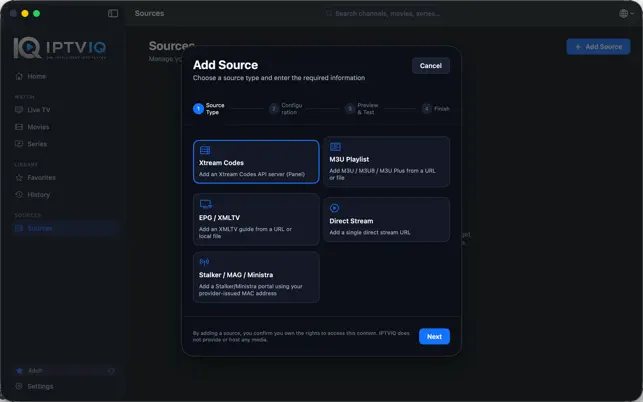
IPTVIQ is a native macOS player for the IPTV source you already have. It runs on macOS 14 or later as a Universal app for Apple Silicon and Intel. The job is desktop viewing that feels like a media application, not like a playlist dropped into a generic window. You bring Xtream Codes, M3U or M3U8, XMLTV, or a compatible Stalker, MAG, or Ministra source. IPTVIQ organizes that source and plays it.
It does not sell channels. It does not include a package. It does not ask you to treat a MacBook as a decoder box for a service the developer owns. If you do not already have a legitimate source, the player has nothing to open.
That Mac-first fact is not a limitation to hide. It is the honest center of the current product. Phone, tablet, and Apple TV builds are planned. They should be described as planned. The published software is the desktop player.
A player, not a portable television service
The category gets noisy because the same words are used for three different things: the provider, the playlist, and the app that renders them.
IPTVIQ is only the third thing.
Video is meant to travel from the provider to the Mac. The app is the interface. It is not supposed to become a middle server that restreams the channel. That keeps IPTVIQ in the correct legal and technical role. It also keeps later ideas such as Cloud Sync in the correct role. Sync, when it exists, should move viewing state. It should not move the television service through someone else’s pipe.
Why the Mac is a serious IPTV screen
A laptop or desktop is not a compromised television. For a lot of people it is the screen they already use for work, news, and long sessions.
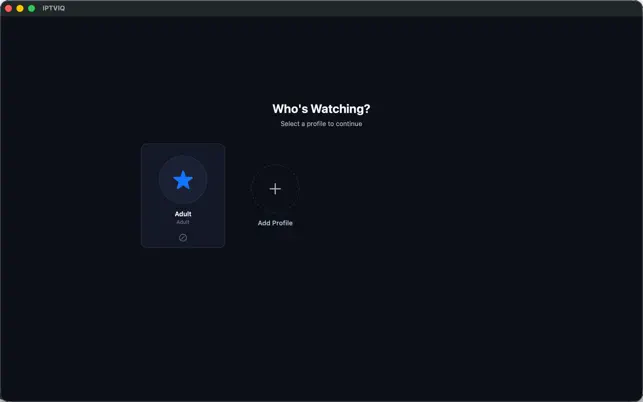
A native Mac player can take advantage of that. Keyboard input makes search and numeric channel entry less painful than a remote. Multiple windows and a large display make a guide, a VOD shelf, and a live channel easier to keep in view. Profiles matter on a shared family Mac. Local recording matters because the machine already has a disk and a folder the user controls.
The alternative is usually worse: a browser tab, a cross-platform wrapper, or a player that looks as if it was designed for a phone and then stretched. IPTVIQ’s current pitch is narrower and cleaner. Build the viewing environment on macOS first.
Sources the Mac can hold side by side
Desktop users often collect leftovers. An Xtream login from one provider. An M3U file saved a year ago. An XMLTV URL for the guide. A MAG-style portal that never got migrated.
IPTVIQ is built to add those sources in one app and switch between them. Optional proxy profiles can be assigned per source: Direct, HTTP, HTTPS, or SOCKS5, independently for connection traffic and media traffic. That is there for awkward networks and picky endpoints. It is not the product headline, and it is not an IPTVIQ relay.
After the source is in, the Mac can present Live TV, movies, series, and guide data as one library instead of three separate utilities.
Live TV on a desktop without feeling like a spreadsheet
Live channels are where playlist apps look cheapest. A long list, small type, no sense of what is actually on.
On the Mac, IPTVIQ treats live TV as something you move through. Categories, numeric entry, and Recall for the last channel are desktop-friendly controls. A per-channel guide and a mini-EPG overlay during playback add the television context that a raw list never had: now, next, and whether the current program is worth keeping on the laptop.
The guide still depends on the source. XMLTV or provider EPG data can be organized. Missing metadata cannot be invented. A native Mac UI does not excuse an empty schedule.
Movies and series on the same machine
Compatible sources expose VOD and series as well as live TV. On a desktop that combination is natural. People already pause a film, answer a message, and come back.
Continue Watching is the feature that makes the Mac feel like a library instead of a file browser. Progress belongs to the profile using the app. The next episode, when the source supports a series structure, should not require climbing back through folders.
The catalog quality is still the provider’s. IPTVIQ can arrange titles and remember position. It cannot turn a badly named list into a boutique storefront.
Search, favorites, and history on a keyboard-driven screen
The Mac is the right device for search-heavy IPTV use. Typing a title is faster than scrolling a dump with a remote.
IPTVIQ searches the loaded library so a specific channel or title does not disappear under thousands of rows. Favorites carve a daily row out of that volume. History brings back what this profile already touched.
Those lists are not global household noise. They sit on profiles. That is more important on a Mac than people admit. The same computer may be used by more than one person during the day. A single unscoped history makes the app feel borrowed.
Catch-up is the provider. Recording is the Mac.
Desktop IPTV articles like to promise pause-and-rewind on every live channel. That promise is sloppy.
Catch-up exists when the provider kept the program.
Watch-from-start exists when the provider allows a restart.
Local DVR exists when IPTVIQ writes a compatible live stream to a folder you choose.
The first two are source features. The third uses the Mac as a recorder. IPTVIQ’s current DVR is manual and local. You decide what to keep. The file stays on the machine. It is personal time-shifting, not a cloud locker and not a publishing tool.
Scheduled guide-based recording is a logical later step. It is not how the current Mac recorder should be described. Cloud DVR is outside the current design for a reason. A recording is a large file. The Mac already has local storage. Turning that file into a sync product changes the app’s shape.
Multiview and recovery on a large display
A desktop display can hold more than one live image without feeling like a gimmick. IPTVIQ supports two-stream multiview. Two compatible channels can sit side by side: two matches, a match and a studio feed, news and a second live event.
Smart Recovery is the quieter desktop feature. A short network stall should not force a hunt back through the list. The player is designed to notice a real playback stall and reconnect. It cannot fix a dead source. It can stop treating a blip as a closed session.
Profiles make a shared Mac usable
Family Macs need more than a PIN on the whole app. They need separate viewing worlds.
IPTVIQ gives each profile its own favorites and history. Kids profiles apply an approved-content rule across Home, Search, Guide, and playback. The restriction has to survive the places a child actually uses. Hiding a tile and leaving the same title searchable is not parental control.
This is also why a future Cloud Sync design would start with profiles and Kids rules rather than with recorded files. The household policy should be able to travel. The movie file does not have to.
Do not sell the Mac app as a whole-home platform yet
The temptation in a multi-site content plan is to write every article as if Apple TV is already installed. It is not part of the current public release.
Cloud Sync is not a shipped Mac toggle in the current listing. If it comes, it should mean state: sources, favorites, history, resume position, some settings, EPG mappings, profiles, and Kids approvals. It should not mean the live channel is fetched from an IPTVIQ server. It should not mean DVR files are uploaded by default.
A web portal, QR pairing, and a device dashboard may help later TV-class setup. They are not how you use the Mac app today. The current workflow is install, add a source, watch.
Playback practicalities
Real sources arrive as mixed pipelines. Common formats such as HLS, MPEG-TS, MPEG-DASH, and MP4 are part of the player’s job. Support is necessary. It is not the story. The story on this site is that the Mac finally has a dedicated environment for those streams instead of a temporary window.
Proxy options, Smart Recovery, and dual-stream layout are the practical layer around that environment. They keep desktop viewing usable when the source is imperfect. They do not turn IPTVIQ into the provider.
How the Mac app compares
| Feature | Basic playlist window | IPTVIQ on Mac today | Later product direction |
|---|---|---|---|
| Native macOS app | Sometimes a wrapper | Yes, macOS 14+ | Same foundation |
| Xtream, M3U, XMLTV, MAG | Partial | Yes, side by side | Yes |
| Live TV and EPG | List, weak guide | Categories, Recall, mini-EPG | Same idea on more screens |
| Movies and series | Folder-like | Integrated + Continue Watching | Resume across future devices |
| Search and favorites | Thin | Library search, per-profile lists | Synced state later |
| Kids profiles | Rare | Enforced in core screens | Same rules on planned devices |
| DVR | Rare or awkward | Manual local folder | Scheduled / EPG-based |
| Multiview | Rare | Two streams | Broader if a platform fits |
| Apple TV / iOS / Android | Separate apps elsewhere | Not current | Planned |
| Cloud Sync | Rare | Not current | User state only |
The comparison should be read left to right without skipping the middle column. The middle column is the product you can install now.
Who a Mac IPTV player is for
This version of IPTVIQ is for people who watch on a computer more than they admit.
It fits students and remote workers who keep a live channel beside a browser. It fits households whose shared computer is the only screen that everyone already knows how to use. It fits anyone who wants a recorder on a disk they control. It fits users who manage more than one source format and do not want three different apps for the same catalog.
It is the wrong expectation if the only goal is an Apple TV icon this afternoon. That screen is on the roadmap. It is not the current download.
Install path
- Install IPTVIQ on a Mac running macOS 14 or later.
- Add the compatible source you are authorized to use.
- Let the app load live TV, guide data, movies, and series.
- Set favorites and profiles after the first stream works.
Recording, Kids restrictions, proxy profiles, and multiview are second-session tools. They should not block the first successful play.
Roadmap, kept in its lane
Now: native Mac player, multiple sources, live guide, VOD and series, search, profile-aware favorites and history, Kids rules, manual local DVR, two-stream multiview, proxy options, Smart Recovery.
Next: iOS, iPadOS, Apple TV, Windows, Android and Android TV, Cloud Sync of user state, scheduled recording.
Possible later: other smart-TV platforms, still listed as candidates rather than promises.
The useful discipline is sequence. Make the Mac app feel like television software. Then copy its state to the next device. Do not pretend the next device is already here.
The source stays yours
IPTVIQ does not grant rights to channels, films, or series. Users stay responsible for provider agreements, copyright, and local law. A native Mac interface does not change the legal character of the stream. A local recording does not make the user a distributor. A future sync feature would copy settings and progress, not the service itself.
Close
A smarter IPTV player can be described in abstract terms: organization, profiles, guides, resume. On this site the concrete version is simpler. IPTVIQ is the Mac application that takes the source you already pay for or already own access to, and makes that source usable on the computer you already sit in front of.
The living-room chapter can come later. The desktop chapter is the one that is shipping.
Your source. Your Mac. A player that stays in its place.